Dining Hall Lockers
About the Lockers
As a Meal Plan holder, you are entitled to use the lockers located on the second floor of Teraanga Commons to store your belongings while at the Dining Hall if you wish to do so.
Lockers are to be used exclusively by Residence Meal Plan holders for a maximum of 2 hours. You must retrieve your belongings before your allotted time expires.
- Wait until the screen has returned to the home page before swiping your card. This ensures you log into your own account and can access your belongings when needed.
- Close the locker door firmly after removing your belongings. This helps keep the lockers available and ready for the next user.
- Place all bag straps and personal items fully inside the locker before closing the door. Loose straps can become caught in adjacent locker doors, making belongings difficult to retrieve.
You may not store your belongings in the lockers overnight.
You can access a locker by swiping your Campus Card or manually entering your Student ID using the keypad at the terminal. Do not use a Campus Card other than your own when accessing a locker.
TZ Smart Lockers
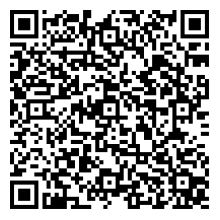
You can use the TZ Smart Lockers app to book your locker in advance without having to wait in line! Simply download the app on either the App Store or Google Play. Once you have downloaded, scan the QR code on the right to link your app to the Dining Hall lockers.
Frequently Asked Questions
-
Login info can sometimes be automatically redirected to a user’s junk or spam folders in many email applications. If this is not the case and the info has not been received, please email us at diningservices@carleton.ca.
-
Campus Card holders who have lost a card and replaced it with a new card may experience issues when attempting to use the lockers. Carleton Dining recommends that such individuals attempt to access the lockers using the login info and PIN sent to their Carleton email address instead of swiping their card. If issues persist, please email us at diningservices@carleton.ca.
-
Lockers may be used for a maximum of 2 hours. If your belongings are stored in a locker for more than the specified time limit, the booking will expire and require Manager intervention to access. Please speak with a Manager at the front desk of the Dining Hall if your booking has expired or you are otherwise unable to retrieve your belongings. Please also note that Managers will not be on site to assist with lockers after the Dining Hall closes at 10:00 pm.
-
If neither your Campus Card nor your login info and PIN are allowing you to access the lockers, please email us at diningservices@carleton.ca.